For job-application teams

Celer: a tailored resume for every job. Every bid counted.

Celer is the workspace for teams that apply on behalf of candidates: collect job links, write a resume and cover letter for each one, fill applications with the Chrome extension, and see every application your team sends — live.

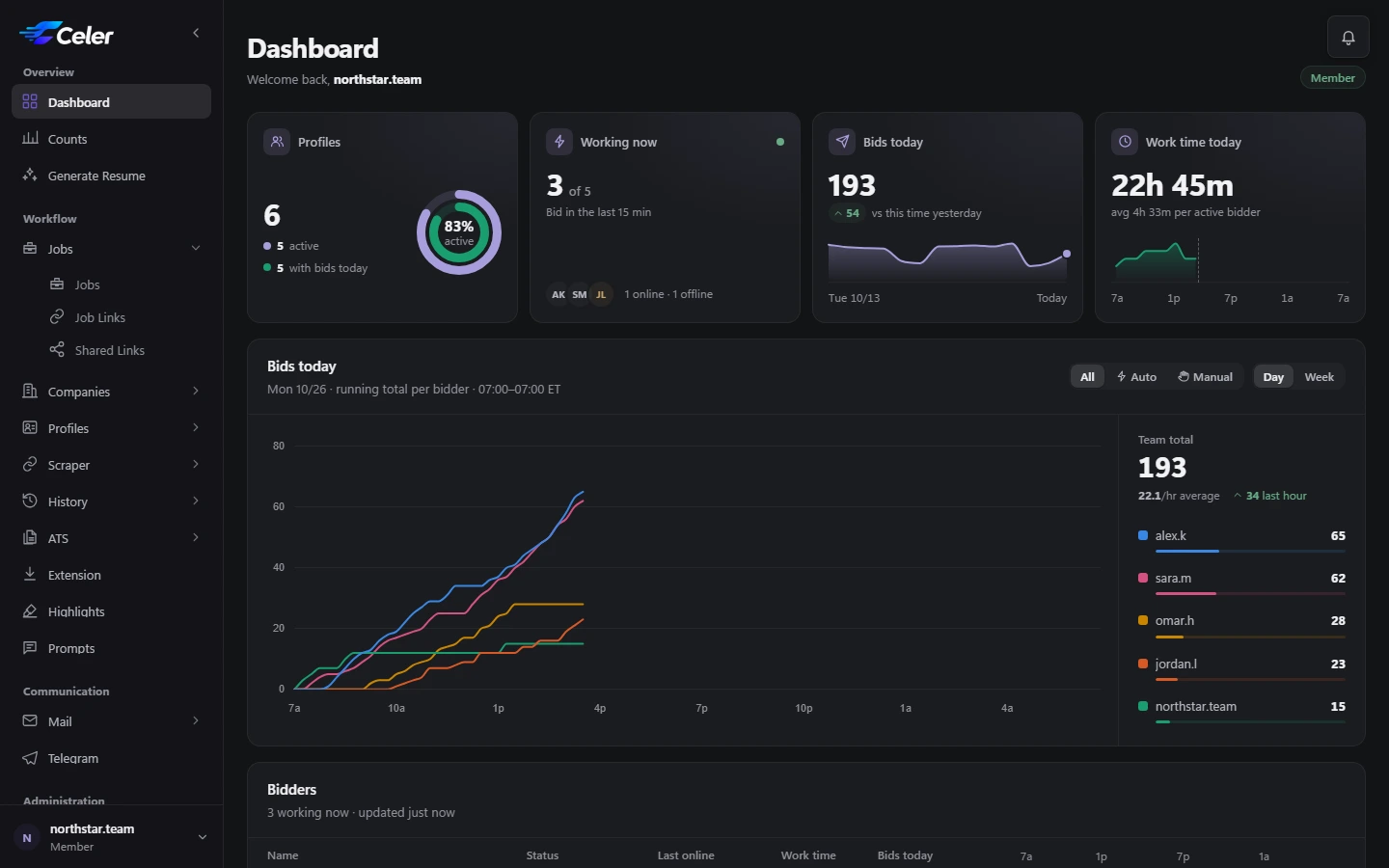
The Celer dashboard: bids today, the team's bids chart and each bidder's activity
Autofill works on
  • Greenhouse
  • Lever
  • Ashby
  • Workable
  • Rippling
  • JazzHR
Your Google account

How Celer uses Google

Celer asks Google only for what the features you use need, and only when you use them.

  • Sign in with Google

    Your name, email address and Google account ID, to create your account and sign you in — and to give free credit only once per person.

  • Google Drive and Docs

    If you connect your Drive and choose a resume template from it, Celer creates those resumes as Google Docs in a “Celer resumes” folder. It can reach only the files it creates and the Docs you pick.

  • Gmail mailboxes you connect

    Celer reads them to find interview emails and verification codes, marks emails as read and sends the replies you write. The profile's team can read its last few minutes of email for codes, and an email goes to OpenAI only when you ask for AI help with it.

Celer's use of information received from Google APIs adheres to the Google API Services User Data Policy, including the Limited Use requirements. Celer does not sell it, use it for advertising, or use it to develop, improve or train AI models.

Celer's AI works with text only. Celer never uses Google APIs or Google user data to create or edit images, including AI-generated non-consensual intimate imagery (NCII).

Privacy Policy: https://celerllc.org/privacy

Why Celer

Why teams choose Celer

Five things every team notices in the first week — and keeps using every day after.

  1. Live bidder tracking
  2. Tailored resumes
  3. Interview auto-check
  4. Instant history search
  5. Smart link scraper
01Bidder management

Know what every bidder is doing — right now

Real activity and real numbers, so you manage your team by facts, not by messages.

  • See what each bidder is working on, live
  • The exact number of bids sent — counted for real, never self-reported
  • A full history of every application each bidder filled
  • No need to share the profile's email — verification codes show up right in the Chrome extension
02Resume tailoring

A tailored resume for every single job

Every application gets a resume written for that job — made your way, in moments.

  • Write it with OpenAI, with your own ChatGPT by hand, or with ChatGPT fully automated
  • Your own custom prompts, in your own style
  • A cover letter to go with it, whenever you want one
  • Pay what OpenAI charges — no markup
03Interview inbox

Interviews found for you. Replies in one click.

Stop digging through mailboxes — the interview emails come to you.

  • Interview emails found automatically, across every profile's inbox
  • All of them together in one place, newest first
  • Reply with an AI-written email in one click
04Application history

Find any application in seconds

The recruiter calls, you find the job, and you walk in prepared.

  • Search every job you ever applied to, instantly
  • See the full job description and the exact resume you sent
  • Share that resume online with one link
  • Prepare for an interview in minutes, not hours
How it works

From your first profile to a sent application

Set up each profile once. After that, every day runs the same simple way — for you and for everyone who applies with you.

Set up once

Profiles, people and prompts.

  1. Create a profile

    A profile is one person you apply as. Pick their resume in Google Docs — with the replacement words summaryBullets, experience_1, experience_2… and skillsBullets where new text goes — and paste their work history as JSON, or add each job by hand.

  2. Invite your bidders

    Send your invite link to the people who apply for you. They sign up and join your team as soon as you accept them.

  3. Assign profiles to bidders

    Choose who applies with each profile. Bidders find the profiles they hold in their daily list and in the Chrome extension.

  4. Write your prompt

    Say in plain words how resumes should read: the tone, what to bring forward, what to keep short. Start from the ready-made default and make it your own.

  5. Pick a prompt per profile

    Give each profile the prompt that suits it — one for engineering roles, another for design. Change it any time; the next resume follows.

Every day

Jobs in, applications out.

  1. Add jobs and summarize

    Paste the job links you found, a batch at a time. One click on Summarize turns each posting into a clean, easy-to-read job description.

  2. Broadcast to your profiles

    Pick the jobs and the profiles they suit, and send. Each profile gets its own list for the day, and a company you marked as interviewing for a profile stays out of its list.

  3. Generate tailored resumes

    Select the day's jobs and create a resume and cover letter for each one, many at a time — every one written from the profile's own template and work history.

  4. Apply with Autofill

    Open a job from your list: on the job boards it supports, the Celer Chrome extension fills in the application and attaches the resume and cover letter. You check the answers and submit.

  5. Check Job and Bid History

    Job History keeps every resume beside its job description; Bid History shows every application your team sent. Look one up the moment a recruiter calls back.

Jobs and Job Links

The day's work,
one clear list

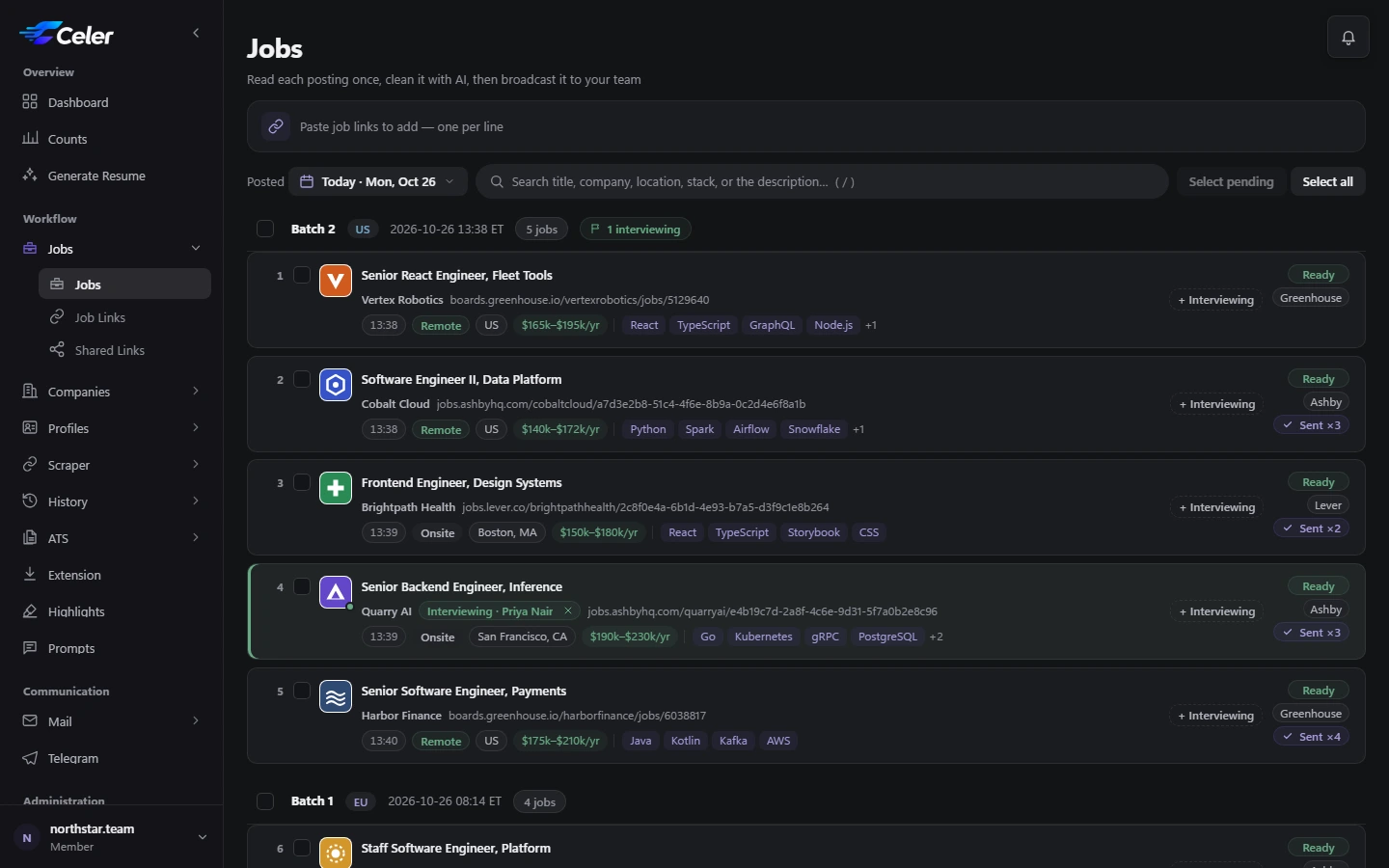
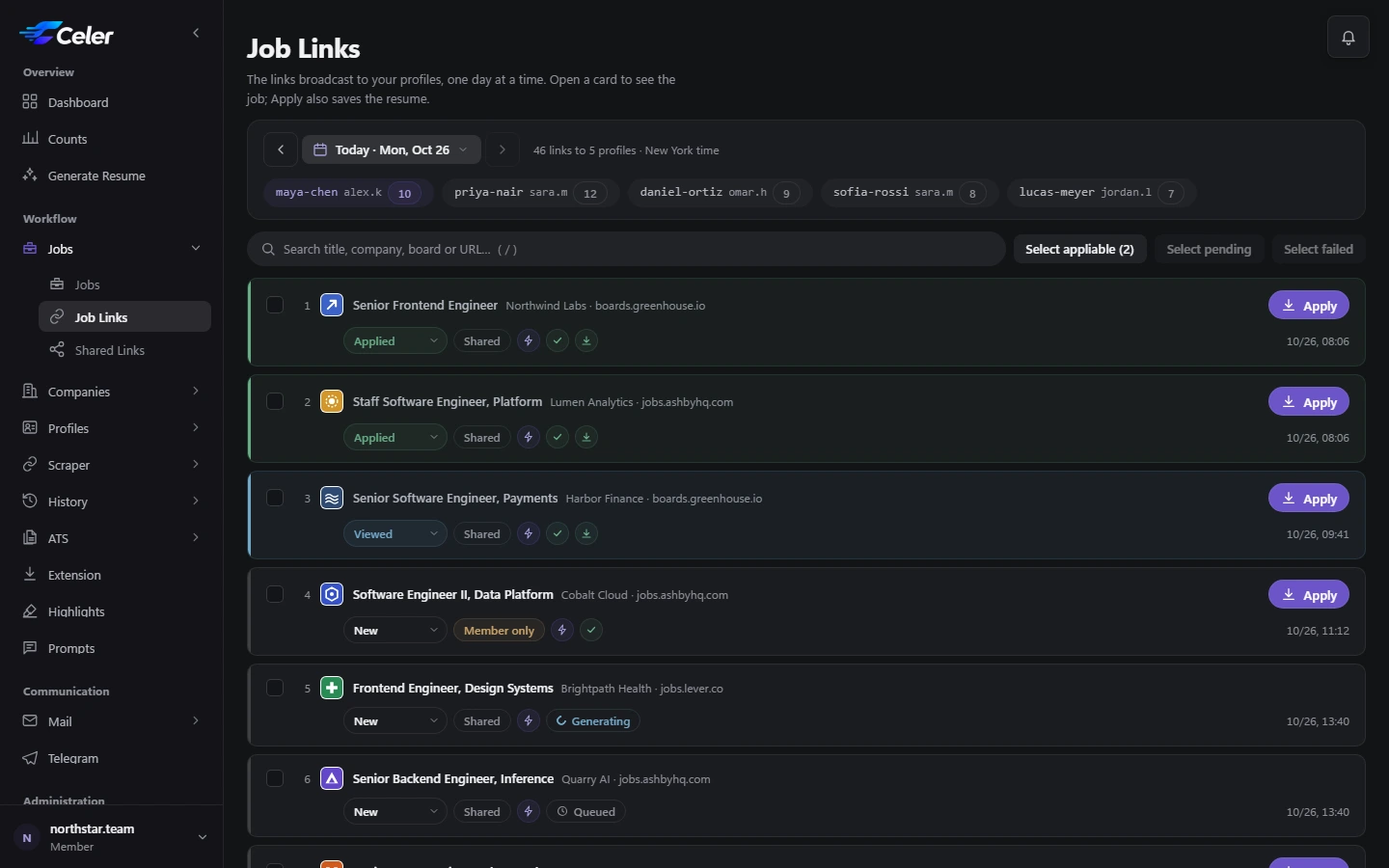
Paste the links you found, clean each posting with one click, and send them to your profiles. Each bidder gets today's jobs, one list per profile.

  • Batches by region — US, CA and EU jobs reach profiles of the same region
  • Generate resumes in bulk with OpenAI, several at once
  • Apply opens the job and saves the resume in the board's format
  • Auto Apply works through the list while Autofill fills each form
Job Links: one profile's jobs for the day, with resume status and Autofill
The Chrome extension

Your copilot
on every job page

Open a job and the side panel already knows the profile, the resume and the job. Build, fill and send without leaving the page.

  • Build a resume from ChatGPT's answer — or let OpenAI write it
  • Autofill answers the questions and attaches the resume and cover letter
  • Copy any profile detail or password with one click
  • Verification codes appear by themselves after you apply
Team dashboard

See the whole team,
as it works

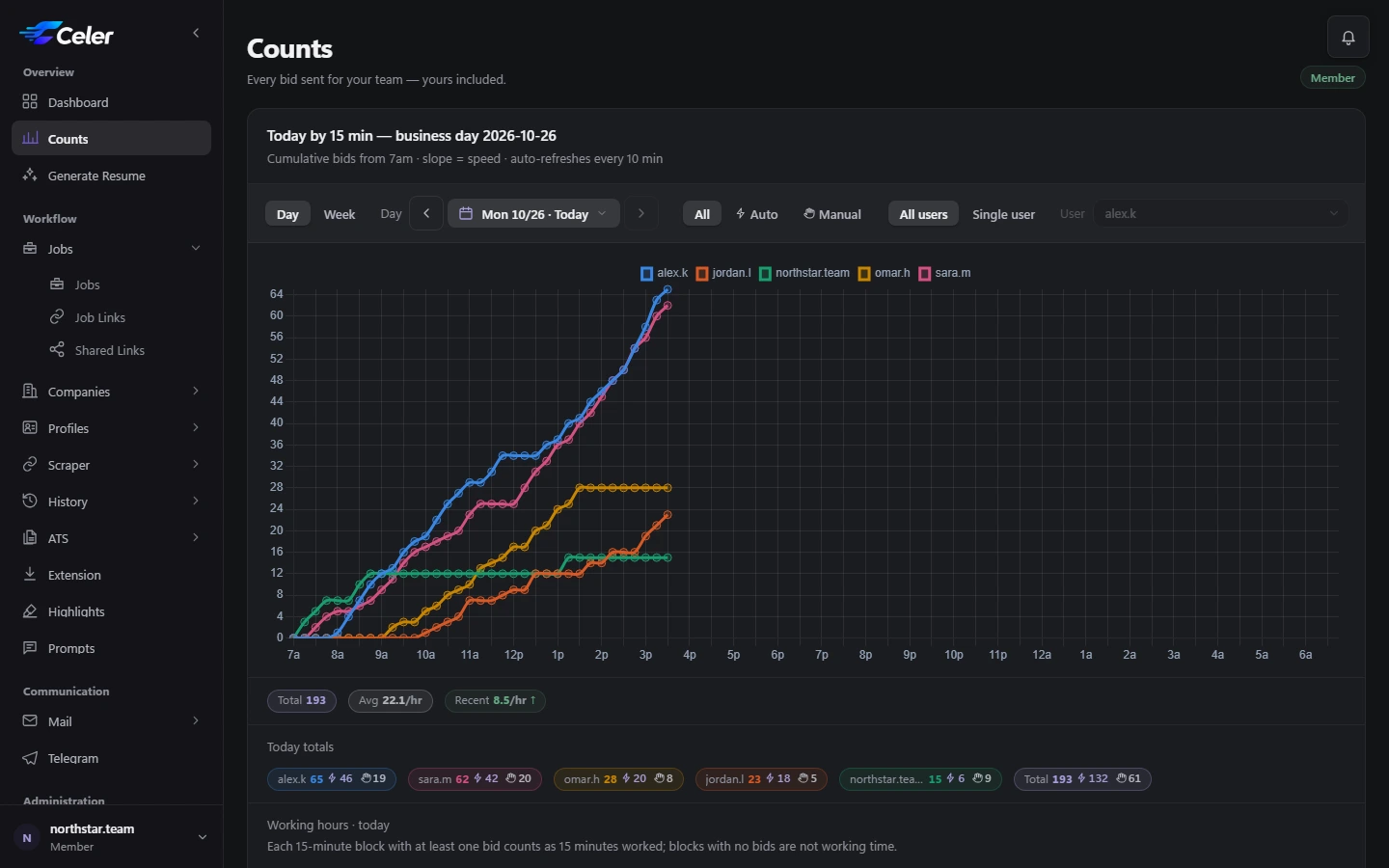
Bids today, who is working right now, Autofill against manual, and the day's pace — for the member, the leaders and every bidder.

  • A live chart of every bidder's day
  • Working time from real activity, not timesheets
  • Counts by day and by week, per person or per profile
  • Links seen: who has opened today's jobs
Counts: each bidder's bids through the day
And more

Everything around the application

  • Link Scraper

    Gather fresh postings from popular job sites, filtered by your keywords.

  • Companies & interview guard

    Mark a company as interviewing and its new jobs never reach that profile again.

  • Interview Inbox

    Interview emails from every mailbox in one inbox, with AI-drafted replies and templates.

  • Verification codes

    After you apply, the code from the profile's mailbox appears in the extension — one click to copy.

  • Job & Bid History

    Every resume and every bid, searchable, with the job description and the resume beside it.

  • Telegram alerts

    Interview emails, meeting reminders and team requests, in a private chat or a group.

  • Prompts per profile

    Your own resume prompts, assigned profile by profile, with a safe built-in default.

  • The right file, every board

    PDF, Word or plain text per job board — downloads and Autofill use the right one.

  • Encrypted backups

    Download your history as an encrypted file and restore it any time.

Built for teams

Everyone sees what they need

One member runs the team; leaders and bidders are hired by members — and can work for more than one.

MemberRuns the team
  • Owns the profile IDs, templates and plan
  • Collects and sends the day's jobs
  • Hires leaders and bidders and sees every count
LeaderKeeps the team moving
  • Assigns profiles to bidders
  • Accepts new bidders
  • Sees the whole team's work
BidderApplies, fast
  • Today's job links, one list per profile
  • Builds resumes and fills applications in the extension
  • Sees the team's numbers, live
The Jobs page: collected postings grouped in batches, ready to send
Pricing

Plans and pricing

Leaders and bidders are free — they work on their member's plan.

Prices in US dollars, paid from prepaid credit. A plan renews by itself for the same length unless you turn that off.

FAQ

Questions, answered

What is a profile ID?

One person you apply as: their resume template (a Google Doc), their work history and their application details. Job links, resumes and counts are all kept per profile.

Do I need an OpenAI key?

No. In ChatGPT mode you paste the prompt into ChatGPT and Celer builds the resume from its answer. In OpenAI mode Celer writes it for you, paid from your credit.

Which job boards does Autofill support?

Greenhouse, Lever, Ashby, Workable, Rippling and JazzHR — also when they're embedded in a company's own careers page. Resumes can be downloaded for any site.

Do leaders and bidders pay?

No. They work on the plan of the member they work for. Only members buy a plan.

Can I change my plan later?

Yes. Switch any time: the new plan starts at once and the unused part of the old one goes back to your credit.

How does paying work?

Add credit on the Credits page — with crypto, or by a request an admin confirms, whichever your admin offers — and the plan is paid from your credit. It renews by itself from your credit unless you turn auto-renew off.

Is our data private?

Each member's profiles, links and history are their team's only. Profile passwords are never sent to the AI, and keys and backups are stored encrypted.

Ready to send more applications?

Create your team's workspace, add a profile and install the extension — you can apply today.